
Short answer: master to around -14 LUFS integrated with a true peak ceiling of -1 dBTP. Spotify normalises playback to -14 LUFS using the ITU-R BS.1770 standard, so a master pushed louder than that gets turned down anyway — you keep the squashed dynamics and lose the loudness. Dynamic range is what survives normalisation, not peak level.
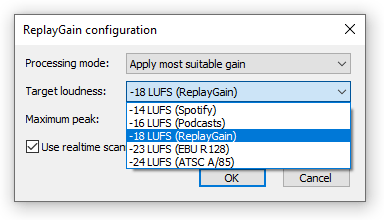 When mastering a song to release on Spotify, an audio engineer takes into account Spotify’s standard of -14dB integrated LUFS of perceived loudness. But to stand out on Spotify doesn’t just mean following Spotify LUFS requirements. It includes having great dynamic range but staying loud at the same time, compressing your track well but avoiding distortion, and many more high-quality features. In other words, you need a professionally-created master record.
Sometimes it happens that an artist uploads a song to the platform, with mastering for Spotify, only to find out later that the song isn’t as perfect as planned. It might seem quiet compared to other tracks on the platform, however, it matches the required by Spotify LUFS. Or the master suddenly sounds not as great as it did before. What could be the reason? How to master a song or an album for Spotify LUFS in such a way that it would sound perfect on the platform?
What is Spotify LUFS?
Mastering for Spotify needs to de done according to the platform’s specifics. Spotify uses the measurement of integrated LUFS to normalize all the tracks to the same loudness for user playback. This is done on Spotify, similar to all other streaming services, to keep the listening comfortable.
Here are some facts about LUFS and its application on Spotify:
- LUFS stands for loudness units to full scale
- Integrated LUFS estimate perceived loudness for a track as a whole (or album as a whole). This is how the required Spotify LUFS is measured.
- It is the measurement of perceived loudness and shows how loud the whole song appears to the listener regardless of the short spikes of loudness
- Spotify LUFS calculating algorithm takes into account that high frequencies seem louder for our ears than low frequencies.
- Spans of silence, particularly at the beginning and at the end of a song are not taken into consideration while calculating integrated LUFS
| Spotify playback setting | Target loudness | What happens to your master |
|---|---|---|
| Loud | -11 LUFS | Applied regardless of your true peak. Spotify inserts a limiter at -1 dB (5 ms attack, 100 ms decay) to stop soft, dynamic tracks from clipping. |
| Normal (default) | -14 LUFS | The level almost every listener hears. Louder masters get negative gain; quieter ones get positive gain. |
| Quiet | -19 LUFS | Everything is turned down further. Nothing is added to the file. |
| Web player, TVs, external speakers | — | No normalisation at all. Your master plays back at its own level. |
Levels published by Spotify. Note the last row: normalisation is not universal, which is one reason a master that behaves on the phone app can feel wildly loud on a smart TV. Sources: Spotify — Loudness normalization, measured per ITU-R BS.1770.
Mastering for Spotify, you should remember that the service normalizes all the submitted records to -14dB integrated LUFS for playback.
If you do album mastering for Spotify, view it as a whole, and also check the songs separately. When a user is streaming an album on Spotify, integrated LUFS is calculated for the album as a whole and the normalization is done accordingly.
Does Spotify compress audio?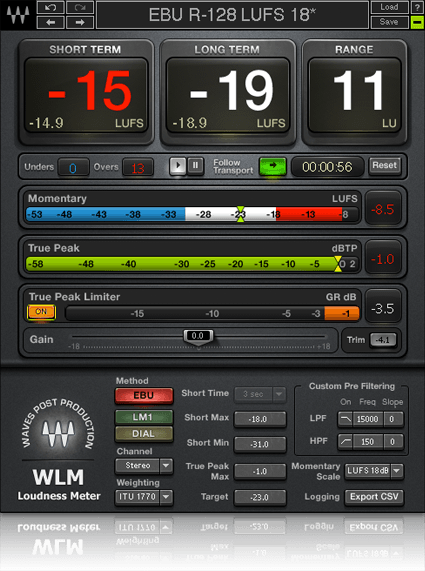
Spotify does not compress tracks, it performs normalization. This means that it simply turns the volume up and down for the playback of each track. Spotify states that it will reduce the volume of any track that is louder than -14dB integrated LUFS, and it will increase the loudness of a track if it’s quieter than -14dB integrated LUFS, however, only until its True Peak is less than -1dB, no more.
It means that the streaming service doesn’t change anything in the record, and your mastering for Spotify stays intact. It only can make the track louder or quieter.
So, a song doesn’t change. However, when we listen to a louder song, it seems to our ears better and more interesting than the same song with the volume turned down. That’s why audio engineers mastering for Spotify try to make the songs loud and powerful, and it’s crucial for artists to hear their tracks on streaming platforms as loud as possible.
How to make your music louder on Spotify?
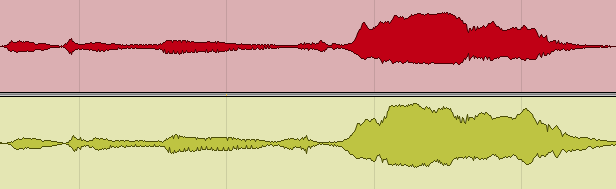
Simply mastering your song louder won’t work, because the service will normalize it down anyways. At the same time, a song with a good dynamic range can reach the same -14dB LUFS with much louder True Peaks than a heavily compressed one. That is why heavy compression and distortion that can harm your song in general, can do even more so on Spotify.
How to master for Spotify LUFS, practical tips:
- Find a reference song on Spotify and compare your master to it. Check the dynamic range, EQ curve, and loudness.
- You do not have to target exactly -14dB LUFS for your song, you can make it a little louder, but not too much.
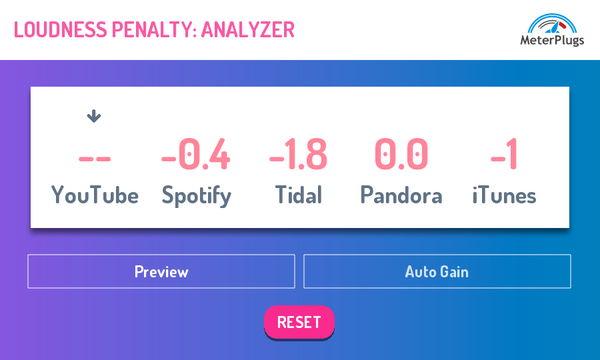
- Use the online service Loudness Penalty to check how your song will sound after normalization according to Spotify loudness penalty.
- Using Loudness Penalty and reference tracks, master your song in such a way that it would sound loud and have a beautiful dynamic range when normalized to Spotify levels -14dB integrated LUFS.
- When mastering an album, take into account, that when the listener chooses to play the whole album, integrated LUFS will be calculated for the album, not for every song. Use it in your favor, but remember, that when songs are played apart from the album, they will be normalized individually.
Life proves, anyways, year after year, that the best sounding songs on Spotify are still the songs that are mixed and mastered professionally, according to industry standards. They have excellent Frequency response and Crest Factor, showing good and expressive Dynamic Range.
Through the years, we see that the best-sounding songs on Spotify have been mixed and mastered very well.
Contact us for professional Mastering for Spotify service!
You can also check our Mastering Services and Stem Mastering.
Our engineers will create the highest quality master which will meet all the industry and Spotify standards. Your song will sound great and competitive on Spotify playlists!
If you’re looking for mixing and mastering services, you’re also in the right place 🙂
Want it to hit Spotify’s targets without guessing? See our mastering for Spotify — $79 per song, 2–3 days per song, 6 revision rounds included.
Spotify mastering FAQ
What LUFS should I master to for Spotify?
Aim for roughly -14 LUFS integrated with a true peak of -1 dBTP. You don’t need to hit -14 exactly. What matters more is that the track still sounds full and dynamic once Spotify applies gain to bring it to that level.
Does Spotify compress or re-encode my master?
No. Spotify measures loudness at upload but applies gain only during playback — the file itself is untouched. The one exception is the “Loud” setting, where a limiter is applied at -1 dB to protect dynamic material from clipping.
Why does my song sound quieter than other tracks on Spotify?
Usually because it was mastered too loud. Heavy limiting reduces crest factor, so once Spotify pulls the level down to -14 LUFS, what’s left sounds flat and small next to a more dynamic master sitting at exactly the same measured loudness.
Will Spotify turn my quiet master up?
Yes, but only as far as the headroom allows. Spotify leaves 1 dB of headroom for lossy encoding, so a track sitting at -20 LUFS with a true peak of -5 dBFS is lifted only to -16 LUFS, not all the way to -14.
Should I master an album differently from a single?
Yes. Spotify normalises a full album as one unit, so relative levels between your tracks are preserved and an intentionally quiet interlude stays quiet. The same tracks played from a playlist or on shuffle are normalised individually, so each one has to stand up on its own too.
Do I need a separate master for every streaming platform?
In most cases, no. A well-made master with genuine dynamic range and -1 dBTP of ceiling translates across platforms. Where a dedicated version does pay off is Apple Digital Masters and Dolby Atmos, which have their own delivery requirements — we’re certified for both.
Send us a song you are working on
A rough demo is fine — it does not need to be mixed. A named engineer listens on studio monitors and writes back exactly what is holding the track back, and what to do about it.
- Usually within two working days
- No card, no obligation
- 11,000+ projects behind the answer