
Short answer: Mid/Side (M/S) is another way to write the same stereo signal. Mid is what the left and right channels have in common, M = (L + R) / 2, and Side is how they differ, S = (L − R) / 2. Decoding reverses it: L = M + S, R = M − S. Nothing is lost on the way, so you can EQ or compress the centre and the width separately and go back to left/right. The catch: Side cancels completely when the song is played in mono, so every M/S move needs a mono check.
Below: the maths and why some plugins scale it differently, what actually ends up in Mid and in Side, how to encode and decode M/S in a DAW, how to read a correlation meter, the M/S moves worth knowing in mixing and mastering, and where M/S does more harm than good.
Mid/Side encoding: the formulas
A stereo file stores two channels, left and right. M/S stores the same information as a sum and a difference. Mid is the sum of the two channels. Side is the difference, which is the same as adding left to a polarity-inverted copy of right.
Different tools scale the sum and difference differently. All three versions below are correct, as long as the encoder and the decoder use the same one:
| Scaling | Encode | Decode |
|---|---|---|
| Half | M = (L + R) / 2 S = (L − R) / 2 | L = M + S R = M − S |
| Plain | M = L + R S = L − R | L = (M + S) / 2 R = (M − S) / 2 |
| −3 dB | M = (L + R) / √2 S = (L − R) / √2 | L = (M + S) / √2 R = (M − S) / √2 |
Half scaling is the most common in textbooks; “plain” is a straight sum and difference; −3 dB divides by √2. The scaling only changes the level of the Mid and Side channels (by 6 dB or 3 dB), not what is in them. With the plain version, a sound in the centre comes out of the Mid channel 6 dB louder than it was in each speaker, and the decoder has to divide by two again (the older “M + S = 2L” form of the equation). The −3 dB version keeps the total energy the same in both directions.
In practice this matters only when you build an encoder and a decoder from different tools, for example encode with one plugin and decode with another, or by hand in the DAW. If the output is louder or quieter than the input with nothing in between, the two halves use different scaling.
What ends up in Mid and in Side
 The picture shows a sine wave, the same wave with its polarity inverted, and their sum, the flat green line. A wave plus its inverted copy is silence. That is exactly what happens to the Side channel when a stereo track is played in mono: left plus right equals 2 × Mid, and the Side cancels out completely.
What each kind of sound contributes:
- A mono sound panned to the centre (usually kick, snare, bass, lead vocal) is identical in both channels, so it is all Mid and no Side.
- A sound panned hard to one side is not all Side. With the half scaling, a sound only in the right channel lands in Mid and in Side at the same level (Side with inverted polarity). Turning the Side down doesn’t remove a hard-panned guitar; it pulls it towards the centre.
- A sound panned part-way sits mostly in Mid, with a smaller share in Side.
- Stereo reverb, room mics, wide synths and stereo widening effects are the parts that differ between the channels. Most of the Side content in a mix comes from them.
So Side is not “the instruments on the sides”. It is everything that is different between left and right. That is why M/S works well for width and stereo tone, and badly for isolating one instrument.
An example: two kick hits
 Here is a short stereo file with two kick hits. The first one is in the centre. The second one is panned 100% right.
Next we run the file through the S1 MS Matrix from the Waves S1 bundle, which turns left/right into Mid and Side.
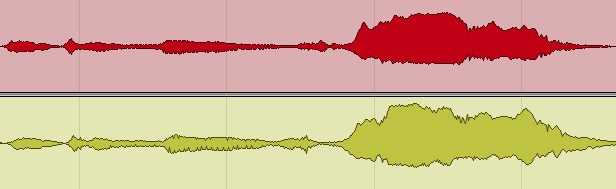
 The output shows the Mid, the Side and the inverted Side. The centred kick is only in Mid; there is nothing of it in Side. The kick panned right shows up in Side, and it is also in Mid, as the maths above predicts.
Decoding puts it back: the left speaker gets Mid plus Side, the right speaker gets Mid plus inverted Side. Played in stereo, the first kick is in the centre again and the second is on the right, exactly as before.
How to encode and decode Mid/Side in a DAW
Processing a stereo track or a mix in M/S
The simplest way is a plugin with an M/S mode, so you never touch the matrix yourself. FabFilter Pro-Q 4, for example, lets you set each band to stereo, left, right, mid or side. If your plugin has no M/S mode:
- Put an M/S encoder on the track (Voxengo MSED is a free one; Waves S1 MS Matrix is another). Mid now comes out of the left channel and Side out of the right.
- Add the processor you want and set it to work on one channel only, or in dual-mono.
- Put a decoder after it (the same plugin in decode mode) to get back to left/right.
- Bypass the processor and check that the output matches the input exactly. If it doesn’t, the encoder and decoder don’t match.
Decoding a Mid/Side microphone recording
M/S is also a stereo microphone technique: one mic (often a cardioid) faces the source and records Mid, and a figure-8 mic turned sideways records Side. You get two mono tracks that have to be decoded before they sound like stereo. In any DAW:
- Pan the Mid track to the centre.
- Duplicate the Side track. Pan the original hard left and the copy hard right.
- Invert the polarity of the copy panned right.
- Group or link the two Side faders. Their level is your width control: down for narrower, up for wider, all the way down for mono.
This gives L = M + S and R = M − S. Check it in mono: the Side tracks should disappear completely and the Mid should stay as it was.
- Usually within one working day
- No card, no obligation
- 11,000+ projects behind the answer
Correlation meters and vectorscopes
 Mid and Side are also how stereo meters show width. In the picture, the vectorscope in the middle draws the stereo image; on most vectorscopes, Mid is the vertical axis and Side the horizontal one, so a mono signal is a vertical line. The correlation meter on the right shows how similar the two channels are, from +1 to −1:
| Reading | Meaning | In mono |
|---|---|---|
| +1 | Both channels identical: all Mid, no Side. | Nothing lost. |
| 0 to +1 | Normal stereo: more Mid than Side. | Some width lost, the song survives. |
| 0 | Channels unrelated: Mid and Side about equally loud. | Noticeably thinner and quieter. |
| Below 0 | More Side than Mid; parts of the channels are in opposite polarity. | Elements drop out or sound hollow. |
| −1 | Channels identical but inverted: all Side. | Silence. |
When left and right are about equally loud, the correlation is simply (Mid level − Side level) / (Mid level + Side level), measured as power. So a mix that reads below zero for long stretches has more Side than Mid, and that is the part that disappears in mono. Short dips on wide reverbs or stereo effects are normal; a mix that sits below zero is not.
Mid/Side EQ and compression
 Three kinds of tools work in M/S:
- Mid/Side EQ treats the centre and the width as separate signals: clean up the centre without dulling the stereo reverb, or brighten the sides without making the vocal harsher.
- Mid/Side compression controls the dynamics of one part only. FabFilter Pro-C 3, for example, has mid-only and side-only modes. It is used less often than M/S EQ, and it is the easiest to get wrong (see below).
- Stereo imagers change the balance between Mid and Side, usually by raising the Side. That is width control, and the fastest way to break mono compatibility.
Use them after the panning and the balance are done and you like where everything sits. M/S fixes and polishes a stereo image; it doesn’t build one. The moves worth knowing:
| Move | On | What it does |
|---|---|---|
| High-pass the sides | Side | Keeps the low end mono, which matters on club systems and vinyl, without narrowing the rest of the image. |
| Boost side highs | Side | Opens up the top end and adds width. The most common M/S move in mastering, and the easiest to overdo. |
| Cut mid low-mids | Mid | Clears congestion around the vocal and bass without thinning the wide guitars and keys. |
| Compress mid only | Mid | Controls the centre (vocal, kick, bass) while reverb tails and wide parts keep breathing. |
| De-ess the mid | Mid | Goes after the lead vocal’s sibilance and leaves stereo cymbals and air alone. |
| Raise side level | Side | Direct width control. Whatever you add here is exactly what disappears in mono. |
Check every M/S move in mono. Side content cancels when the channels are summed, so a mix that gets its impact from a boosted Side band can collapse on a phone speaker or a club PA.
On single sources, M/S is often more precise than on the whole mix: de-essing the Mid of a doubled vocal, or high-passing the Side of a wide synth or a stereo room mic. On the master it should be gentle, because every move touches every instrument at once.
Where Mid/Side processing hurts
- Too much Side. Boost the Side by a lot and the mix sounds huge in stereo and thin or hollow in mono. Phones, many Bluetooth speakers and club systems are mono or close to it, and so is anyone standing far from a pair of speakers. Listen to the mix in mono before you commit, and look at the correlation meter.
- Side highs boosted too far. The Side carries reverb, room sound, cymbals, noise and some of the sibilance. A big high boost there brings all of that forward and makes the top end harsh and wide in an unnatural way.
- Trying to isolate an instrument. A hard-panned guitar is half Mid, half Side, so turning the Side down doesn’t remove it and Side EQ doesn’t reach all of it. If one instrument is the problem, fix that track in the mix.
- Compressing Mid and Side differently. If the Mid is compressed and the Side isn’t, the balance between them changes with every loud hit, and the stereo image gets wider each time the centre ducks. On a whole mix this is easy to hear as a pumping width.
- M/S on mono or almost-mono material. A mono track has no Side; a near-mono one has only noise and small differences in the Side. Boosting it raises the noise.
- Fixing a narrow mix at mastering. Width comes from the arrangement, the recording and the panning. If the mix is narrow, it is usually better to fix it in the mix than to push the Side on the master.
Our article on how to get a wide stereo sound in mastering goes through the widening tools and how to tell whether a track really lacks width. The low end is a separate case: below about 100 Hz it should usually stay mono, which our guide to mixing low end explains.
Mid/Side in our mastering
When we master a song, M/S is one tool among many: usually a small EQ move on the Side, a mono low end, and a check in mono and on the correlation meter before the master is approved. If the stereo image needs bigger changes than that, we tell you what to change in the mix rather than forcing it at the master stage.
If you want a second opinion on the width of your mix, send it for a free track review and an engineer will tell you what is holding it back. Or send the finished mix to our mastering service: $50 per song, back in 2–3 days, with 6 revision rounds included.
When the track is ready for the final stage, get it mixed and mastered by our engineers from $133 per song, 2–3 days per song, 6 revision rounds included. The full price list covers every other service.
Mid/Side processing FAQ
What is the difference between Mid/Side and Left/Right?
Left/Right splits the signal by speaker. Mid/Side splits it by what the two channels have in common: Mid is the sum, Side is the difference. Both describe the same audio; M/S just gives you separate control over the centre and the width.
What is the formula for Mid and Side?
Usually M = (L + R) / 2 and S = (L − R) / 2, decoded as L = M + S and R = M − S. Some tools skip the division by two or use 1/√2 instead. The scaling changes only the level, as long as the encoder and decoder match.
How do I decode Mid/Side audio?
With a plugin, use an M/S decoder such as Voxengo MSED or Waves S1 MS Matrix. By hand, for a Mid/Side mic recording: pan Mid to the centre, duplicate Side, pan the two copies hard left and right, and invert the polarity of the right one. The Side level then sets the width.
Does Mid/Side processing cause phase problems?
Encoding and decoding themselves are lossless: converting back gives you the original. Problems come from what you do in between, mostly heavy Side boosts, which create material that cancels when the mix is played in mono.
Should the low end always be mono?
Below roughly 100 Hz, usually yes. There is little useful stereo information down there, and wide low frequencies cause tracking problems on vinyl and unpredictable results on large systems. Our guide to mixing low end covers the reasoning. If the record is going to vinyl, our vinyl mastering service centres the low end for the cut.
How wide is too wide?
When the mono version loses elements or the centre feels hollow. A correlation meter that sits below zero for long stretches is a warning. Width should make a mix feel bigger, not make the middle disappear.
Can I use Mid/Side while mixing, or only in mastering?
Both. On individual sources it is often more precise than on the whole mix, for example de-essing the Mid of a doubled vocal or high-passing the Side of a wide synth. In mastering it is a broader, gentler tool.
Which plugins support Mid/Side?
Many modern EQs and some compressors have an M/S mode, for example FabFilter Pro-Q 4 and Pro-C 3, and iZotope Ozone. For any plugin without one, put an M/S encoder before it and a decoder after it; Voxengo MSED does both and is free.
Stuck on a mix?
Send it as it is — a rough demo or a mix in progress. Max Rayden or Ivan Taiga listens on studio monitors and writes back exactly what is holding the track back, and what to do about it.
- Usually within one working day
- No card, no obligation
- 11,000+ projects behind the answer
Order Complete Mixing and Mastering What it includes All prices