Short answer: master to around -14 LUFS integrated with a true peak of -1 dBTP and you will be right for most streaming. But the number matters less than what survives it: platforms turn loud masters down, so a crushed track arrives at the same measured loudness as a dynamic one and sounds smaller. Dynamic range is what you keep after normalisation.
The average loudness of master records for the music industry in 2022 is around -8 RMS, about -10 LUFS, with the output ceiling around -0,3 dB. However, the loudness targets can vary for different genres. At the same time, each streaming platform treats the uploaded records differently, so keep reading this article to learn more.
What dB should a master be?
This is a tricky question for a mastering engineer because how loud the music is can be measured in dB in many different ways. While mastering, you’ll be paying attention to these measurements in particular: Peak, True Peak, LUFS, dBSPL, and RMS.
The most important loudness evaluation for mastering, which is used by all the platforms, is LUFS. So, to ask how loud should you master your music to, you need to identify what exactly you want to measure.
 What is LUFS
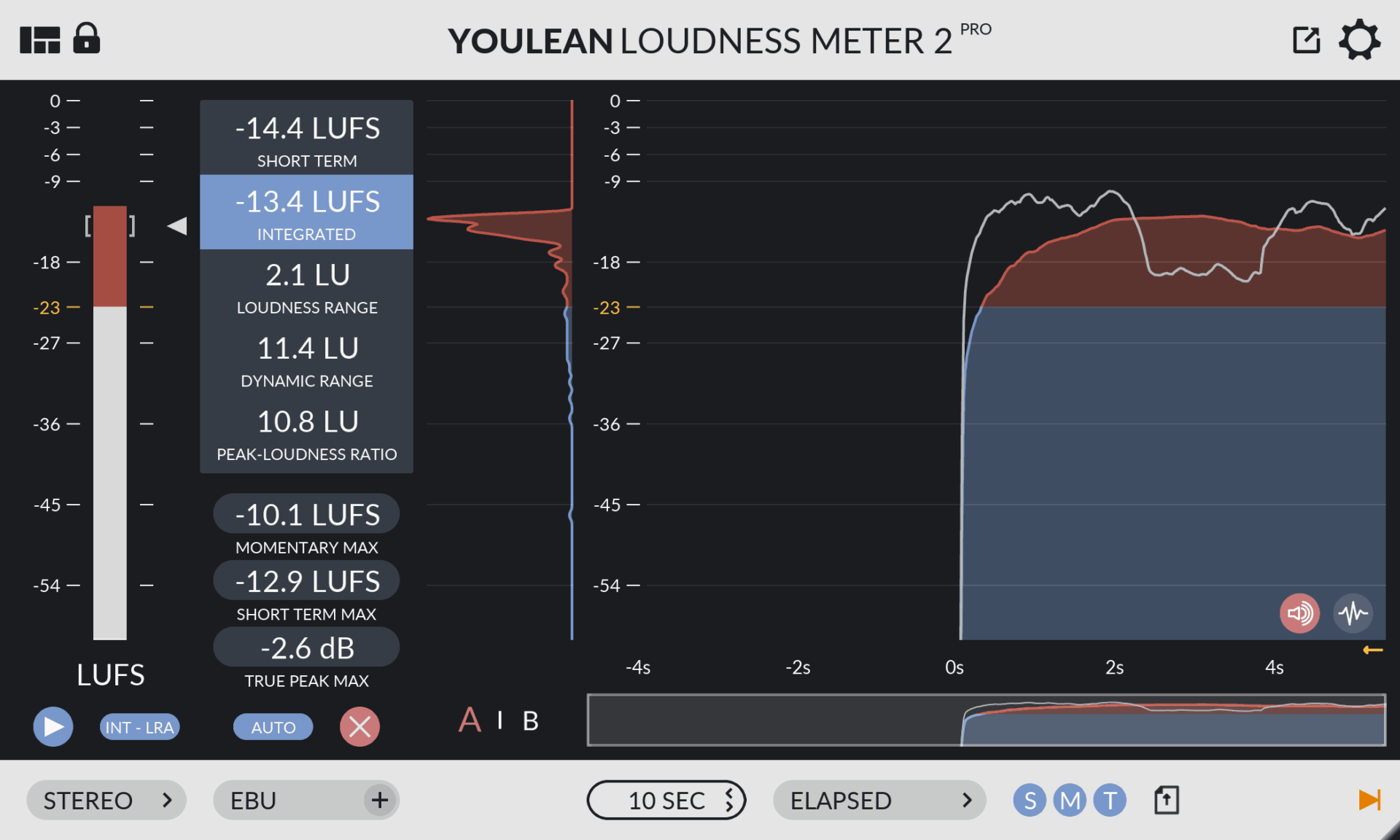
LUFS refers to Loudness Units relative to Full Scale. It’s the most popular measure of loudness that uses an advanced algorithm for calculating how loud the music sounds to the listener. There can be short-term LUFS that are calculated for each 2-3 seconds of the music, and integrated LUFS that are calculated for the entire song.
In this article, we are talking about the integrated loudness (integrated LUFS), streaming services use this measure to determine the overall loudness of the songs and to make sure the streaming maintains relatively similar loudness from one song to another.
This way, the platforms ensure great listener experience, so that the listener doesn’t have to change the volume of the playback device all the time. All the music sounds to the listener as if it has the same volume.
 How much loudness do you need for mastering?
All songs are different, you may choose the loudness depending on your style and genre. Of course, a loud EDM music and an acoustic ballad will have different loudness. So every type of music has its normal loudness level, but the numbers vary greatly even inside one genre.
We could name here the styles and their approximate loudness, but there will be no point in doing this. Nowadays everyone decides for themselves how loud their release should be.
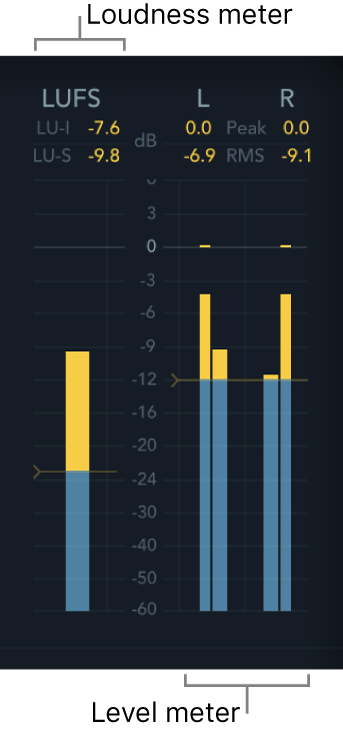
That’s why you will come across a rock track mastered to integrated LUFS value of -8 or -9, or a pop track, mastered to -7 LUFS, at the same time, some aggressive EDM master may go as loud as -5 LUFS. So, the main idea here is to find approximately the right range for your genre and keep your loudness within those limits.
How loud should my master be in RMS?
RMS measures the average power of the sound over the duration of the song. It stands for ‘root mean square,’ which is an alternative method of calculating the average value. Since greater power is required to reproduce louder sounds, RMS serves as a reliable indicator of music loudness.
You can use RMS meters to monitor your track’s loudness, but mostly for your own work. Because almost all the platforms will look at the LUFS measurement.
Generally speaking, mastering to -9 – -8 RMS will give you an industry-level, pretty loud song.
How many integrated LUFS should I aim for?
Generally, most of the streaming services agree on the streaming level of around -14 LUFS int. However, Apple Music sets this limit a bit lower, at around -16 LUFS int. Some tutorials suggest that your song should match this limit and be at the exact level of the streaming loudness, but that’s not true.
As we see now, most master records are louder than this limit. This happens because the streaming services, like Spotify for example, will normalize the song to -14 LUFS anyways. So the sound will be basically the same if you master the song to -14 LUFS or louder, it will still be streaming with an integrated LUFS value of -14.
So, the answer is, that you can master your music to -14 LUFS or louder, up to -7 LUFS.
It’s not a great idea, though, to master quieter than -14 LUFS. There are several reasons why it’s not good to do so.
Three reasons not to master too quiet:
- First, all platforms turn loud music down to their maximum loudness (usually -14 LUFS). However, not all of them turn the quieter songs up to match the needed level. So, if you upload to YouTube a song that has the level of, for example, -16 LUFS int, it will stay the same, and will not be turned up to match -14 LUFS as other songs.
- The second reason for not mastering quieter than -14 LUFS is that some streaming platforms like Spotify and Apple Music do turn the volume up for quieter songs. However, during this procedure, they might apply their limiter to cut some of the louder peaks. How your music will sound with this limiting you may not know, and you don’t want to experiment with your music, you want it to stay exactly as you mixed it, right?
- And the third reason not to master quieter than the desired level is, that a streaming platform might not bring your song up to -14 LUFS because of its peaks. If your song has a good dynamic range, the platform can turn the volume up only within the True Peak headroom you have provided. Platforms do not compress the music, so, they just might not be able to bring your song up to -14 LUFS integrated loudness.
This means, that if you make a universal master record, which you are going to upload to a bunch of streaming services, you want to make it not quiet, but rather a bit louder than -14 LUFS
How loud should my master be for Streaming Services?
 Each service normalizes songs using its own algorithm. Let’s now look at the streaming services one by one.
Spotify
Spotify is the leader among streaming platforms. The streaming loudness of this service is -14db integrated LUFS. The songs will be normalized to this level, the loud songs will be made quieter, and the quiet songs will be made louder if possible.
If you’d like to learn more, we have a special article devoted to mastering for Spotify: Spotify LUFS and how to master tracks for Spotify, check it out.
Apple Music
This service will normalize your song to around -16dB LUFS, bringing the volume up or down if necessary
SoundCloud
This platform normalizes the songs similar to Spotify, bringing the volume up or down to match the loudness around -14 LUFS int.
YouTube
For music videos, YouTube also has a standard loudness targets of -14 LUFS. That means that the volume of your song will be reduced to match the standard. Unfortunately, if your song is quieter than -14 LUFS, YouTube will not bring the volume up, so keep this in mind.
Sometimes you can notice that artists make different mixes for different platforms. The version they upload on YouTube, for example, is different form the same song on Apple Music. It happens not too often, but sometimes, mostly in rap genre.
How to determine the necessary loudness and dynamic range?
To determine how loud you should be mastering, you need to compare your song with reference tracks from your style and genre and determine the loudness targets.
To download a reference song, just loop back your sound card and record the stream of the song. After that, normalize the reference mix, for example, to around 0.3dB headroom. Now you may measure the loudness of the song, its dynamic range, check all the other characteristics, and compare them to the track you are working on.
When comparing the tracks for the best mastering, make sure they both are normalized to the same headroom.
How many LUFS is too many?
After reaching approximately -7 LUFS the music doesn’t sound louder anymore, it just sounds worse. And the form of the sound wave will become not so much a sine as a square because of the limiters and clippings. This is basically what happens if you are mastering louder than -7dB – -8dB LUFS.
Moreover, if your song is over-compressed and too loud, the streaming platform will normalize your track down and your music may not benefit from it. All the distortion will show, and there will be no dynamics to the song.
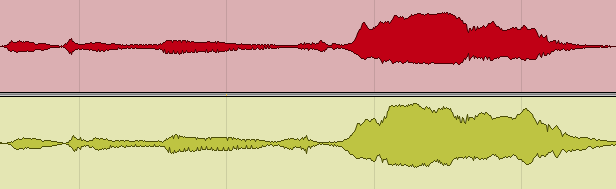
Look at this picture, for example, this is a song that is heavily compressed and way too louder than -14 LUFS int.
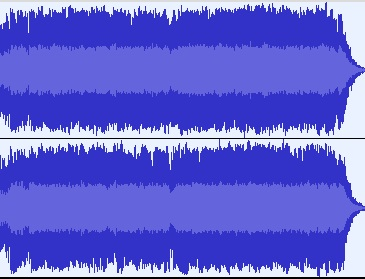
But the streaming platform will normalize it to -14 LUFS and get this:
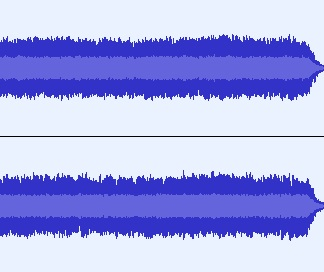
At the same time, with the same -14 LUFS, the sound wave of a more dynamic song will look like this:
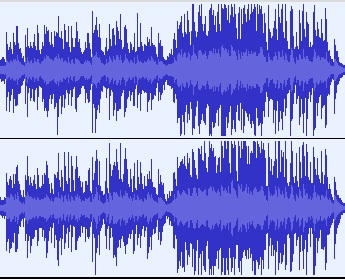
As you see, its peaks will be louder than those in a heavily compressed song. So, for the listener, it may sound more striking and more attractive.
So, how do I make a perfect song?
The conclusion to remember is, for best mastering, you need to keep the balance. You need to make your song loud (-14 LUFS or more), maintaining a good dynamic range at the same time. Every genre has its peculiarities of course, but you can determine them, analyzing the reference tracks.
Working with mixing and mastering for more than a decade, we have always seen that if a song is professionally-created, well-balanced, and sounds perfect, it will almost always be perfect on streaming platforms as well. So, if you want to sound great on a platform, the most important thing you have to focus on is creating great, professional master records.
Mastering with Major Mixing
At our Major Mixing mixing and mastering studio, our mastering engineers have created thousands of master records for all possible genres. Artists that work with us upload their new songs to all the platforms.
We have had thousands of examples to see how our master records sound on the streaming services, and we learned what is important in mixing and mastering so the song would become a chart-topper material.
If you want to make a great release, we’ll be happy to mix your song professionally and create a perfect master record for you. Just contact us, we’ll be happy to help you boost your career!
| Platform | Target | What it does to your master |
|---|---|---|
| Spotify | -14 LUFS | Turns loud masters down and quiet ones up, leaving 1 dB of headroom for lossy encoding. Premium users can pick -11 or -19. |
| Apple Music | -16 LUFS | Sound Check adjusts in both directions. |
| YouTube | -14 LUFS | Turns loud masters down but does not lift quiet ones — so mastering too quiet costs you here. |
| SoundCloud | -14 LUFS | Behaves much like Spotify, adjusting in both directions. |
| True peak | -1 dBTP | Headroom for lossy encoding, which can push peaks above the sample-level maximum. Go to -2 dBTP if the master is louder than -14 LUFS. |
Note the YouTube row: normalisation is not symmetrical everywhere. That asymmetry is the practical argument against mastering deliberately quiet in the hope of “winning” on dynamics.
Rather have a release-ready master done by an engineer? Our online mastering service is $79 per song, back in 2–3 days per song, with 6 revision rounds included.
Loudness FAQ
What LUFS should I master to?
Around -14 LUFS integrated with -1 dBTP works across most platforms. You don’t need to hit it exactly. What matters is that the track still sounds full once the platform applies gain to reach that level.
Is the loudness war over?
For streaming, largely yes. Normalisation removed the advantage of being louder, so squashing a master now costs dynamics without buying volume. It still matters in contexts without normalisation — club playback, some broadcast, and files played locally.
Can I master too quiet?
Yes. YouTube turns loud tracks down but won’t lift quiet ones, and Spotify only lifts as far as the headroom allows. A master sitting well below the target can simply arrive quieter than everything around it.
What’s the difference between LUFS and RMS?
RMS is a raw average of signal energy. LUFS applies a frequency weighting that approximates how loud something actually seems, which is why every platform standardised on it. Two tracks with identical RMS can differ noticeably in LUFS.
Should I make different masters for different platforms?
Usually not. A well-made master with real dynamic range and -1 dBTP translates everywhere. Dedicated versions are worth it for Apple Digital Masters and Dolby Atmos, which have their own delivery requirements.
Why does my master sound quieter than commercial tracks?
Usually crest factor rather than level. Heavy limiting flattens transients, so once the platform normalises everything to the same measured loudness, the track with more dynamic range sounds bigger. Loudness after normalisation comes from the mix, not the limiter.
Send us a song you are working on
A rough demo is fine — it does not need to be mixed. A named engineer listens on studio monitors and writes back exactly what is holding the track back, and what to do about it.
- Usually within two working days
- No card, no obligation
- 11,000+ projects behind the answer