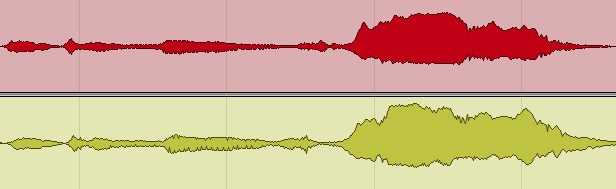

Short answer: to mix a band that was recorded playing together, fix phase first, then decide track by track how much bleed to remove: clean the toms and other spot mics, keep the overheads and room mics as the glue, and don’t chop the lead vocal. Build the stereo picture from the room mics, balance kick, bass and snare before anything else, and skip heavy timing or pitch correction, because every edit shows up in the other mics too.
This guide is about one specific kind of project: a multitrack of a band performing together in one room, in a studio session or at a concert. Any genre. What makes it different from a normal song mix is that the tracks were recorded at the same time, with all the microphones in the same space, so every instrument is on every mic to some degree.
We mix and master band recordings regularly, and the order of work below is the one we use. If you’re mixing a rock song that was built up track by track in the studio, our rock mixing guide is the better starting point; genre-specific advice for country, gospel and jazz is in separate articles.
Band mixing at a glance
| Step | What to do | Common mistake |
|---|---|---|
| 1. Phase | Check polarity and timing between every pair of mics on the same source, starting with the drums. | Ignored, which quietly costs low end that no EQ can restore. |
| 2. Bleed | Clean spot mics (toms, percussion) by editing; keep overheads and rooms as glue. | Gating everything, so the kit sounds disconnected and the vocal mic “ducks” the band. |
| 3. Panning | Pan to match where the musicians stood, as heard in the room mics. | Panning against the room mic, so every instrument appears in two places. |
| 4. Rhythm | Kick, bass and snare balanced before anything else. | Starting with guitars or vocals on an unstable foundation. |
| 5. Others | Light processing; let the room do the blending. | Over-processing spot mics until they no longer match their own bleed. |
| 6. Vocals | Compression and careful top-end EQ, because the vocal mic carries the cymbals. | Boosting the top of the vocal and turning the hi-hat into the loudest thing in the mix. |
| 7. Dynamics | Keep the build the band played between sections. | Bus compression that flattens the performance. |
The steps are in the order we work. Each is explained below.
Why mixing a band recording is difficult
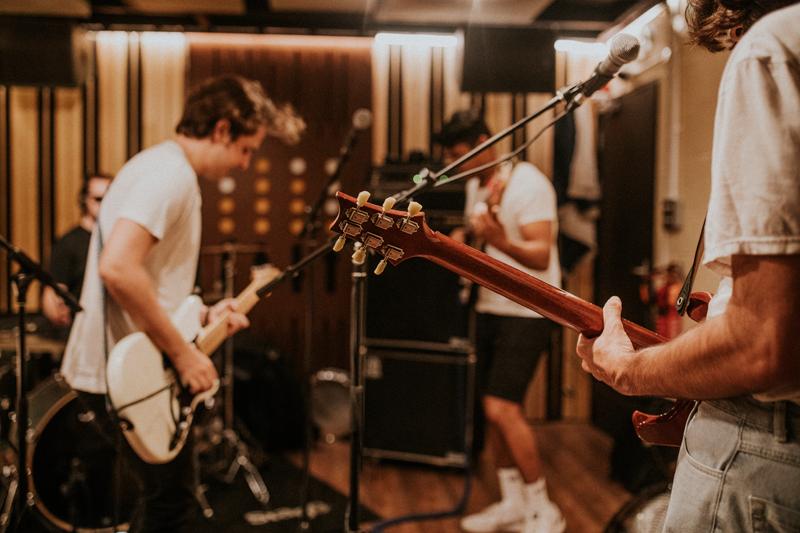 In a typical song multitrack, every instrument and vocal is recorded separately, one at a time. In a band recording, all the parts are captured in one room at once. Every difficulty of a live band mix comes from that.
Bleed
Bleed (also called spill or leakage) is the sound of the other instruments getting into a microphone meant for one source. The vocal mic picks up the drums, the guitar mic picks up the bass amp, the snare mic picks up the hi-hat. Each track contains its own part plus, at a lower level, everyone else.
Bleed isn’t only a problem. It’s also what makes a band recording sound like a band in a room instead of separate overdubs. The skill is deciding where it helps and where it hurts.
Room and overhead mics
Some tracks are meant to capture several sources at once: drum overheads, drum room mics and, in many sessions, a pair of room mics for the whole band. These tracks carry the space and the natural balance of the performance, and they need a different approach from the close mics.
 Phase problems
Because each instrument reaches several microphones at different distances, the same sound arrives at each mic at a slightly different time. Sound travels about 34 cm per millisecond, so a snare that is 1 m from the overheads arrives there roughly 3 ms after it reaches the close mic.
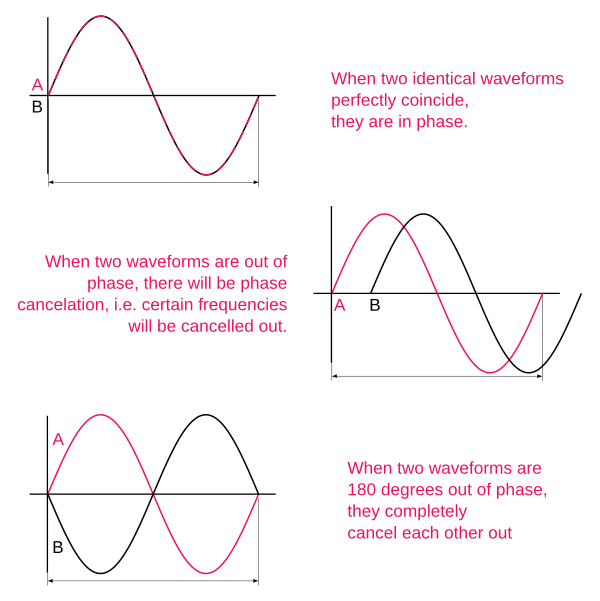
When those tracks are played together, the delay makes some frequencies cancel and others add up. The result can be mild (a thinner, quieter instrument) or severe (a part that sounds fine on each track and almost disappears when they are combined). This is the single biggest technical issue in band mixing.
Step 1: fix phase before anything else
 EQ and compression decisions are meaningless until the phase relationships are right, because phase changes the tone of everything. Start with the drums, where it matters most and where the low end is decided.
 Work through the session in this order:
- Check pairs. Overheads against the snare mic, overheads against the kick, the kick inside against the kick outside, snare top against snare bottom, close mics against the drum room.
- Flip polarity first. Listen to each pair with the polarity of one track inverted and keep whichever version has more low end and body. Snare bottom mics and kick inside/outside pairs often need it.
- Then align in time. If polarity alone doesn’t fix it, nudge one track by a fraction of a millisecond to a few milliseconds until the sound is full across the spectrum. A sample-delay plugin or your DAW’s track delay does the same thing without moving audio.
- Repeat for other sources. A guitar cab with two mics, a bass with DI and amp, an acoustic guitar with two mics.
Use your ears first; a correlation meter or phase-alignment plugin can confirm what you hear. Keep checking as you mix. EQ, especially steep filters and big boosts, shifts phase too, and a pair that was aligned at the start can drift once processing goes on. Pay most attention to the low mids and the bass.
- Usually within one working day
- No card, no obligation
- 11,000+ projects behind the answer
Step 2: decide how much bleed to remove
We start by editing, not by gating. Gates react to level, and in a band recording the bleed is often almost as loud as the source, so they open and close at the wrong moments. Manual editing is slower and works better.
- Toms: cut out everything between the hits. Toms are played rarely and their mics pick up the whole kit, so cleaning them alone makes the drums noticeably clearer.
- Spot mics on percussion, extra amps, auxiliary instruments: clean the sections where they don’t play.
- Kick and snare: edit or gate gently. Watch the snare’s ghost notes; cut them off and the groove changes.
- Overheads and rooms: leave them alone. They are the picture of the kit and the glue of the band.
- Lead vocal: usually leave it whole.
The lead vocal is where over-cleaning backfires. The band is audible in the vocal mic. If you cut out every gap between phrases, the accompaniment gets louder whenever the singer sings and drops when they stop, a ducking effect that listeners hear as something being wrong. The vocal is also going to be compressed, which makes the bleed louder, so the jumps become even more obvious after processing. For many recordings it’s better to keep the vocal track intact and control the bleed with EQ and level.
Step 3: build the stereo image from the room
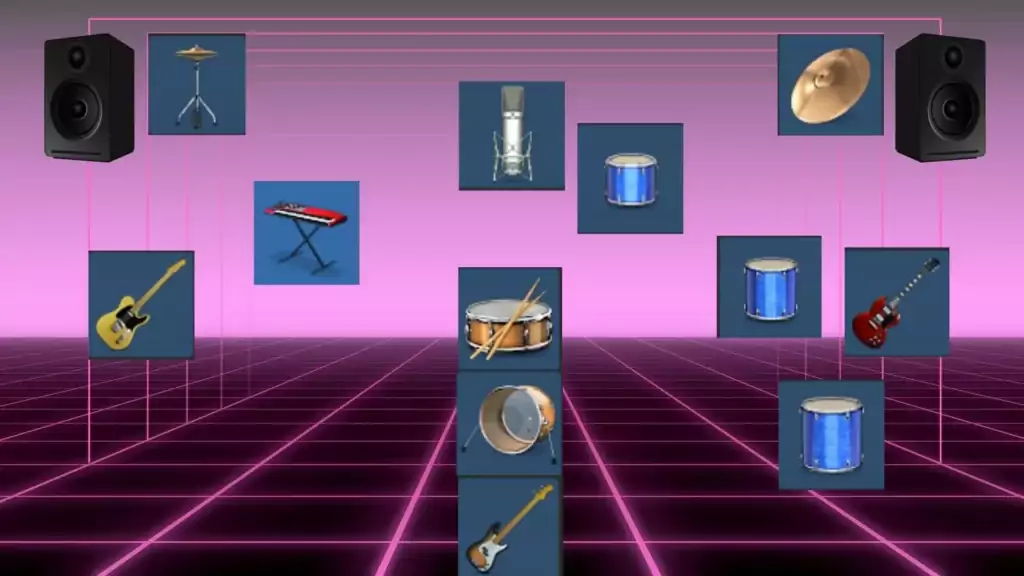
A large part of the sound of a band recording comes from the room mics. In them, the instruments already appear in space the way they stood on stage. Listen to the room mics on their own, work out where everyone was, and pan the close mics to match. The same goes for the drums: listen to the overheads and drum room to hear where the toms, hi-hat and ride were, and pan the close mics to the same positions.
If you pan against the room, each instrument appears in two places at once and the image smears.
Step 4: mix the drums
Once bleed and phase are under control, the mix itself is much closer to a normal session. We start with the drums.
 Kick drum
A gentle gate or edit, then EQ and compression. The choice of processing depends entirely on the recording. The guideline is to keep the drum sounding the way it sounded in the room. We often add slight saturation (a preamp or tape emulation) early on individual drums.
Snare
The same approach as the kick, with extra care on the gate so the ghost notes stay. Keep compression moderate: the snare mic carries a lot of hi-hat, and heavy compression brings the hat up with it.
 Toms
EQ and compression as for kick and snare. A tip we use often: tape saturation on the toms. A tape emulation set to the slower speed, 7.5 ips, adds a slight compression and thickens them nicely.
Overheads
Overheads are the kit; the close mics add definition to it. If the drums sound like separate samples rather than one instrument, the overheads are too low. Process them lightly: gentle saturation, gentle compression, a high-pass filter, and if the cymbals are harsh around 3 kHz, a small cut.
We also often put a compressor on the overheads with the snare close mic as the sidechain input. The snare you build on its own mic is also present in the overheads, and the two versions stack. Ducking the overheads for the short moment of each snare hit gives you control over the overall snare sound. The duck is so short that it isn’t heard as pumping.
Drum room mic
This mic hears the whole kit from a listener’s position and is usually processed very little. Two reasons to touch it: a room resonance, usually somewhere around 200–500 Hz, that needs a cut; or a mix that needs bigger, longer drums, in which case compressing the room mic hard makes the kit wider and more powerful.
Drum bus
Route all the drums to a bus. We usually add some tape emulation there and, where needed, a little bus compression to hold the kit together. Our guide to parallel drum compression covers how to add weight without losing the transients.
Step 5: bass, then bass and drums together
 Bass in a band recording is usually compressed firmly so it holds a steady level under the drums. A low-pass filter helps too: the bass amp mic picks up a lot of cymbal bleed in the high frequencies, and the bass doesn’t need them. If there is both a DI and an amp track, align them first (Step 1).
Multiband sidechain compression on the bass, keyed from the kick, lowers only the bass’s low end at each kick hit, so the two don’t stack in the same frequencies.
Then send drums and bass to one bus and listen to them as one rhythm section. Live drums are very dynamic. If the biggest peaks jump far above the rest of the mix, catching them with a little limiting or clipping on the drum or rhythm bus keeps the mix closer to how it will sound once mastered. When you send the mix for mastering, keep the master bus itself clean and the peaks around −6 dB.
Step 6: the other instruments
Pianos, keys, guitars, horns and everything else are mixed according to the song; there is no single recipe. One rule holds for band recordings: process as little as you can. A spot mic that is EQ’d and compressed heavily no longer matches the same instrument in the room mics and the other tracks’ bleed, and the two versions start to fight. Some EQ, a little compression and a little reverb are usually enough.
Step 7: vocals
Singers recorded with the band are often on dynamic mics, close to the grille, with monitors and drums around them. That creates predictable problems.
 Plosives
Pops on P and B sounds, the low thump you get when the singer is very close to the mic. Remove them with a high-pass filter, clip-gain on the worst ones, or a dedicated de-plosive tool.
Compression and EQ
A live vocal has a wide dynamic range and usually needs a fair amount of compression, often in two stages, plus volume automation. Be very careful with top-end boosts. The vocal mic carries a lot of cymbal and hi-hat, and compressing the vocal raises that bleed too. Boost the top and you can change the shape of the hats you built in the drum mix. More on vocal chains in how to mix a vocal.
Band room mics
Treat them like the drum room: for a big, powerful sound, compress them; for a natural live sound, leave them almost untouched and use them to set how close or far the band feels.
What not to do on a band recording
Because every track is connected to the others through bleed, some normal mixing tools don’t work here.
Timing correction
You usually can’t move one track earlier or later without ruining the mix: the same instrument is in the other mics at its original time, so you would create flams and phase problems. If timing has to be fixed, the whole band (or the whole drum kit, all mics together) has to be edited as a group. That is a dedicated editing job; our music editing service exists for it.
Pitch correction
Tuning a vocal also tunes the bleed in that track, so whatever else is audible in the vocal mic gets pitch-shifted with it. And the corrected vocal is still present, uncorrected, in the room mics and other tracks, where it will now clash with the tuned version. Gentle, note-by-note correction on clear notes can work; heavy tuning usually doesn’t.
Choosing references for a band mix
As with any mix, references matter, but choose them carefully. Many recordings you’ll find of bands playing live are raw, unmixed or recorded on a phone, and aiming at one of them will take your mix the wrong way. Pick a professionally mixed, officially released record in the same genre with a similar line-up: either a studio album the band cut together, or an official live album such as Nirvana’s MTV Unplugged in New York (1994) if you’re mixing a concert. Compare at matched loudness.
How to send a band recording for mixing
If you’re handing the session to an engineer, a few things make a big difference:
- Export every track, including all room and overhead mics, as a separate WAV from the same start point, at the session’s sample rate.
- Don’t phase-align, gate or tune tracks yourself before sending, unless that’s part of the sound you want; send the raw tracks.
- Include a note with the microphone list or a stage plot if you have one, and say which songs or takes are the final ones.
- Add a rough mix and a released reference.
Our guide to preparing a multitrack session has the full checklist. If you’re mixing a whole live set or record, see how to mix an album for keeping the songs consistent.
Rather have an engineer take it from here? Band recordings are a regular part of our work. Complete mixing and mastering starts at $133 per song, and mixing only at $113 — 2–3 days per song, 6 revision rounds included. Live sessions with many mics fall into higher track-count tiers; the exact total is on the order page and in all prices. Not sure what the recording needs? Start with a free track review.
Mixing a band — FAQ
Where should I start when mixing a band?
With phase on the drums, then bleed cleanup on the spot mics. After that, balance kick, bass and snare together; that relationship decides whether everything else has a foundation. Build outward from there rather than starting with the most interesting parts.
How do you mix a live recording?
The same way as a band session: align phase, clean the spot mics by editing rather than gating, pan to match the room mics, keep processing light so the close mics still match their bleed, and avoid heavy timing or pitch correction. Use the audience and room mics to set how live the result feels.
Should I gate the drums?
Sparingly. Bleed between drum mics is what makes a kit sound like one instrument in a room. Edit the toms between hits, gate kick and snare gently if at all, and leave the overheads and rooms alone. Heavy gating is a common cause of drums that sound disconnected.
How do I check drum phase?
Play pairs of mics together and flip the polarity of one, keeping whichever version has more low end. Then check each close mic against the overheads and nudge timing if needed. Phase problems cost weight that no EQ boost gets back.
Should I remove bleed from the vocal mic?
Usually not by cutting the gaps. The band is audible in the vocal mic, so muting it between phrases makes the accompaniment jump up and down with the singer, and compression makes that worse. Control the bleed with EQ and level instead, and be careful with top-end boosts.
Can you use Auto-Tune or timing correction on a live band recording?
Only with care. Moving or tuning one track also moves or tunes the bleed in it, and the original version is still in the other mics. Timing fixes have to be done on groups of tracks together; pitch fixes should be gentle and limited to clear notes.
Should a band mix be heavily compressed?
No. The dynamics between sections are usually the point of a live band. Compress individual tracks where they need control, catch the biggest drum peaks if necessary, and keep bus compression light enough that the build still builds.
How much does it cost to mix a band recording?
At Major Mixing the price depends on the number of tracks: Complete Mixing and Mastering is $133, $168, $242 or $318 per song for up to 20, 40, 60 and 90 tracks, and mixing only starts at $113. Delivery is 2–3 days per song with 6 revision rounds. The order page shows the exact total before you pay.
Stuck on a mix?
Send it as it is — a rough demo or a mix in progress. Max Rayden or Ivan Taiga listens on studio monitors and writes back exactly what is holding the track back, and what to do about it.
- Usually within one working day
- No card, no obligation
- 11,000+ projects behind the answer
Order Complete Mixing and Mastering What it includes All prices