
Short answer: to mix an 808, start with a sample that already fits the song and tune it to the key. Give the kick and the 808 separate moments with short gaps or sidechain compression, add saturation so the harmonics carry it on phone and laptop speakers, keep everything below ~100 Hz in mono, and set the decay so notes end before the next one starts. Compress it for even notes, then set the level against the kick and vocal using a reference track. There is no correct dB number for an 808.
These are the 808 mixing tips we use in our own sessions, with the mistakes that cause most 808 problems and what to do instead. They apply whether you’re mixing a full song or a beat for an artist, and in any DAW. If you want the whole hip-hop chain, vocals and loudness included, read our guide to mixing and mastering hip-hop. This article stays on the 808.
What an 808 is, and why it’s hard to mix
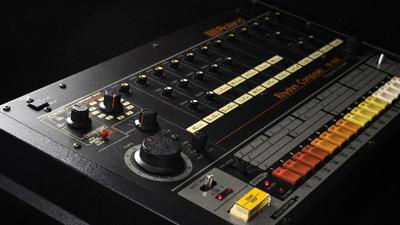 The name comes from the Roland TR-808 drum machine. Its bass drum had a long, tuned, boomy decay, and that sound became the basis of today’s 808 samples, which have since evolved far beyond the original: different attacks, lengths, amounts of distortion and glide.
An 808 is a pitched instrument. Each sample has a note, or can be tuned to one, and in most modern productions it plays the bass line. It’s usually paired with a separate kick drum; in some beats the 808 itself, with a punchy start, does the job of both.
808s spread from hip-hop into pop, R&B and electronic music. They are hard to mix for three reasons: most of their energy sits in a range many speakers can’t reproduce, their pitch is hard to hear, and their long sustain collides with the kick.
808 frequency chart: notes and harmonics
Most 808 notes in modern songs sit roughly between C1 and C2. The fundamental is the deep part you feel on a club system; the harmonics above it are what you hear on small speakers.
| Note | Fundamental | 2nd | 3rd |
|---|---|---|---|
| C1 | 32.7 Hz | 65.4 Hz | 98.1 Hz |
| D1 | 36.7 Hz | 73.4 Hz | 110.1 Hz |
| E1 | 41.2 Hz | 82.4 Hz | 123.6 Hz |
| F1 | 43.7 Hz | 87.3 Hz | 131.0 Hz |
| G1 | 49.0 Hz | 98.0 Hz | 147.0 Hz |
| A1 | 55.0 Hz | 110.0 Hz | 165.0 Hz |
| B1 | 61.7 Hz | 123.5 Hz | 185.2 Hz |
| C2 | 65.4 Hz | 130.8 Hz | 196.2 Hz |
2nd and 3rd are the first two harmonics above the fundamental (2× and 3× its frequency). Standard tuning, A4 = 440 Hz. Phone and laptop speakers reproduce little or nothing at these fundamentals, so on them the 808 is heard through its harmonics. That is why saturation (tip #3) matters.
#1 Use as little processing as you can
Aim to process the 808 as little as possible. That sounds backwards, but most 808 samples on the market are already processed, often with distortion, compression and EQ printed in. Stacking more on top usually makes them worse.
A good 808 sample either fits the song or it doesn’t. If it fits, set its level against the kick and the other parts, make the small moves below, and stop. If you find yourself fighting it with plugin after plugin, change the sample (tip #7).
#2 Cut short gaps in the 808 for the kick
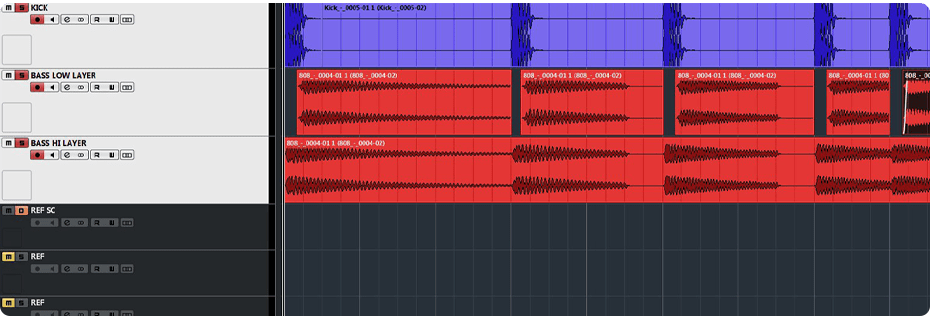 The kick and the 808 are the two parts that carry the beat, and they get in each other’s way. The kick is short with a loud attack. The 808 has a long sustain in the same range. Played at the same moment, they mask each other and the low end turns to mud.
The cleanest fix is manual: cut a short gap in the 808 every time the kick hits, with a short fade on each edge so there are no clicks. Listeners won’t hear the gaps as gaps. They’ll just hear the kick and the 808 both clearly. If you don’t want to edit by hand, sidechain compression (tip #8) does a similar job automatically.
Also decide which one owns the very bottom. Usually it’s the 808, with the kick providing the click and punch higher up. Two parts both trying to own the sub is the most common reason an 808 and kick clash.
#3 Add saturation so the 808 is heard on small speakers
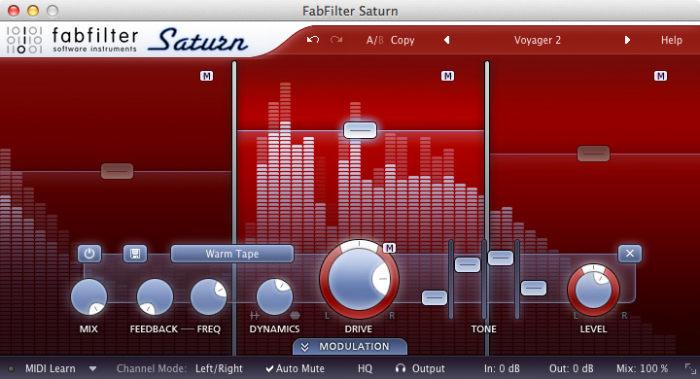 An 808 can sound huge on studio monitors and vanish on a phone. Most consumer speakers and earbuds don’t reproduce sub frequencies with any power, so a clean sine-like 808 simply isn’t there for a lot of listeners.
Saturation or distortion adds harmonics above the fundamental (see the chart above). The ear hears those harmonics and fills in the missing fundamental, so the bass line stays audible on laptop speakers and cheap headphones. Tape-style and tube-style saturators add warmth; heavier distortion gives the aggressive, gritty 808 common in trap and drill.
Two cautions. Check the result in mono, because some stereo saturators widen the low end. And saturate in moderation: too much flattens the 808’s attack and fills the low mids, where it starts masking the vocal.
#4 Compress the 808 for even notes
Compression on an 808 is about consistency: every note should come out at a similar level so the bass line feels solid and doesn’t jump on certain pitches. A compressor with moderate gain reduction usually does this. Heavy compression or limiting flattens the start of each note, and that initial punch is a big part of what makes an 808 hit rather than hum.
The kick is a separate decision. Many kicks need little or no compression, and squashing one takes the life out of it. Compress the kick only if it needs more consistency or punch, with an attack slow enough to let the transient through.
Sometimes it helps to send the kick and 808 to one bus and add light compression or saturation there, after each has been treated on its own. That can glue them into one low-end sound. It’s optional, and worth A/B testing against the dry bus.
- Usually within one working day
- No card, no obligation
- 11,000+ projects behind the answer
#5 Check that the 808 is in tune
 An 808 can be out of tune for weeks without you noticing. At around 60 Hz and below, the ear is poor at judging pitch, so a wrong note doesn’t sound wrong. The low end just feels unstable.
The trick: transpose the 808 up one or two octaves (12 or 24 semitones) and listen with the rest of the track. Wrong notes become obvious. Fix the tuning up there, then bring it back down by the same amount. A tuner plugin on the 808 helps too, though gliding and heavily distorted 808s can confuse it.
Tune the sample to the key of the song (usually its root note) and make the 808 pattern follow the chord roots, or another note that clearly works with the harmony. Whatever you pick, know what pitch your 808 is and choose it on purpose.
#6 Set the length and decay to the tempo
A long 808 tail that rings into the next note turns separate notes into one continuous drone. That’s one of the most common reasons an 808 pattern sounds muddy even when the level and EQ are right.
Shorten the notes or the decay so each one ends before the next begins, especially in fast patterns. Use glides on purpose, not as overlaps you forgot to trim. And keep everything below roughly 100 Hz in mono: stereo sub-bass can partly cancel on systems that sum to mono, including many club systems and phone speakers.
#7 When in doubt, change the sample
 Sometimes you’ve been working on a beat for hours and the low end still isn’t right, and you can’t say why. Very often the answer is a different 808.
There are thousands of 808 samples, short and long, clean and distorted, punchy and soft. Instead of forcing one sample to fit with every plugin you own, try a few others against the song. A sample that already has the attack, length and character you want needs almost no processing (tip #1). If you use 808s from packs, check the licence; our guide to sampling legally explains what to look for.
#8 Use sidechain compression so the kick and 808 take turns
If you haven’t cut gaps for the kick by hand (tip #2), make that space with processing.
Don’t EQ the kick’s frequencies out of the 808
A common idea is to carve the kick’s main frequencies out of the 808 with a static EQ cut. It can work a little, but it removes part of the 808 on every note, including the ones where the kick isn’t playing. You lose more than you gain.
 How to sidechain the 808 to the kick
Put a compressor on the 808 and feed the kick into its sidechain input. Each time the kick hits, the 808 ducks for a moment. Use a fast attack so the duck starts with the kick, and set the release so the 808 comes back as the kick’s body fades. Too long a release and the 808 pumps; too short and the kick still gets masked. Set it by ear at the tempo of the song.
Use multiband sidechain for a cleaner result
If full-band ducking makes the 808 sound choppy, sidechain only the band where the kick’s weight sits, for example below about 100 Hz, using a multiband compressor or dynamic EQ triggered by the kick. The 808’s upper harmonics keep playing, so the duck is much less noticeable while the kick still cuts through.
#9 Layer 808s only in different frequency ranges
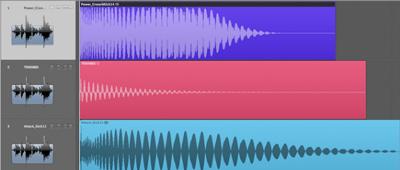 The simple rule: don’t layer two 808s that occupy the same part of the spectrum. Low frequencies are far more prone to phase problems than high ones, and two bass sounds in the same range will partially cancel and reinforce each other note by note. The result is an uneven, muddy low end.
If your sample lacks something, don’t patch it with a second 808 on top. Look for a sample that already has it.
Layering can work when each layer covers a different band: for example a clean sub layer for the fundamental and a distorted layer, high-passed above it, for the harmonics. Filter each layer so they overlap as little as possible, and check the combined sound in mono.
#10 Find the right 808 level
 An 808 should feel loud and powerful, but if it dominates everything else, the song gets weaker, not stronger. Listen to current hits in your genre: the 808 is strong but it leaves room for the vocal, the melody and the details.
So how loud should an 808 be in the mix? There is no correct number on a meter. Set the vocal (or the lead) first, then bring the 808 up until it supports the song without covering it. Then compare with a reference track at matched loudness, and check on a phone, in a car and on headphones. If the 808 disappears on the phone, add harmonics (tip #3) rather than more level.
Help the 808 cut through by high-passing the other parts that don’t need low end: pads, guitars, keys, vocals. And watch your headroom. A heavily compressed, sustained 808 eats a lot of it, and if it does, the master can’t get loud without distorting the low end. Our guide to mixing low end covers the rest of the bottom of the mix.
How to tell if your 808 is mixed right
| Check | Right | Wrong |
|---|---|---|
| Tuning | In the key of the song. | Low end feels unstable though nothing sounds off. |
| Phone speaker | Bass line still audible. | 808 vanishes: needs harmonics. |
| Kick and 808 | Both heard on every hit. | Kick disappears, or the two smear. |
| Decay | Notes end before the next. | Tails overlap into a drone. |
| Mono | Sub stays solid in mono. | Low end drops when summed. |
| Compression | Even notes, punchy start. | Flat, hum-like notes. |
| Level | Strong, vocal stays clear. | 808 covers the vocal and melody. |
Mixing 808s with Major Mixing
If the 808 still fights the kick or disappears on phones after all of this, it may be time for a second pair of ears. You can send the track for free mix feedback, and an engineer will tell you what’s holding the low end back. It’s free, with no order needed.
If you’d rather hand it over: we mix beats from $95 per beat, full songs from $113, and mixing with mastering from $133 per song, 2–3 days per song with 6 revision rounds included.
Rather have an engineer take it from here? Send us the stems for a mix from $113 per song, or get it mixed and mastered from $133 — 2–3 days per song, 6 revision rounds included.
Mixing 808s FAQ
How do you mix 808s?
Pick a sample that already fits, tune it to the key, give the kick its own moment with short gaps or sidechain compression, add saturation for small speakers, keep the sub in mono, set the decay to the tempo, compress lightly for even notes and set the level against a reference track.
Why does my 808 disappear on phone speakers?
Phone speakers can’t reproduce the 808’s fundamental, which usually sits between about 30 and 65 Hz. They rely on harmonics to imply it. Saturating the 808 creates those harmonics, so the bass line is still heard where the sub isn’t.
How loud should the 808 be in the mix?
There is no fixed dB value. Set the vocal first, bring the 808 up until it supports the song without covering it, then compare against a reference in your genre at matched loudness and check on a phone and in a car.
How do I stop the 808 and kick clashing?
Decide which owns the sub, usually the 808, and let the kick provide the click and punch above it. Then give the kick its moment: cut short gaps in the 808 on each kick hit, or sidechain the 808 to the kick with a fast attack and a release timed to the kick.
Should 808s be tuned?
Yes, to the key of the track. An 808 is a pitched instrument, and an out-of-tune one makes the entire low end feel unsettled even when nothing else is wrong. Transpose it up an octave or two to hear wrong notes clearly.
Should 808s be in mono?
Below roughly 100 Hz, yes. Stereo low end can partly cancel on systems that sum to mono, and club and phone playback is exactly where an 808 needs to work. Width, if you want it, belongs in the harmonics, and should be checked in mono.
How much compression does an 808 need?
Enough for consistency between notes, usually moderate. Heavy compression or limiting removes the start of each note, which is a large part of what makes it read as a hit rather than a tone. Many 808 samples are already compressed, so some need none at all.
How do I sidechain an 808 to the kick in FL Studio?
Route the kick and 808 to their own mixer inserts. Select the kick’s insert, right-click the send switch (the arrow) at the bottom of the 808’s insert and choose “Sidechain to this track”. Then put Fruity Limiter on the 808 insert, open its COMP tab, right-click the SIDECHAIN selector and pick the kick’s insert, and lower the threshold until the 808 ducks on each kick. Our FL Studio export guide covers sending the stems afterwards.
Stuck on a mix?
Send it as it is — a rough demo or a mix in progress. Max Rayden or Ivan Taiga listens on studio monitors and writes back exactly what is holding the track back, and what to do about it.
- Usually within one working day
- No card, no obligation
- 11,000+ projects behind the answer
Order Complete Mixing and Mastering What it includes All prices